Your face in every shot
Your photo is the face reference for each cut, so your face, hair and outfit stay yours while the camera moves around a crowded party. The other partygoers are invented, not real people.
Photo effect · Burning Bridges
This Burning Bridges AI video template recreates the trend’s party moment from one photo: a fast-cut, 12-second montage of you dancing, toasting and scanning a crowded room, cut to the beat with friends cheering around you. It is a photo effect on AI Rap Videos, not the original music video or song, and it is not affiliated with the artist. Add your photo in the creator below and watch the real example on the right before you start.
Upload a photo to preview your Burning Bridges AI video.
Three steps, all in the creator at the top of this page.
Under “Your photo”, add one clear photo. A sharp face, good light and nothing covering the eyes give the best result. If you want two people in the clip, switch to “Separate selfies” and add one portrait each.
The effect is already set on this page, so you cannot pick a different one by mistake. Under “Model & length”, the length is fixed at 12 seconds; choose 9:16, 1:1 or 16:9, confirm that you may use the photo, and press the button. It shows the cost before anything is charged.
The finished clip opens on its own page and stays in My videos, where you can download it or send it to your phone. Rules for the platforms you post on are covered in the questions below.
If your account has enough credits, they are charged when the render starts and the full video is yours. If not, and the creator offers it, you can keep one unpaid video, watch a short watermarked preview, and unlock the full file later with credits or a one-time payment.
One photo in, one short party clip out. Everything below is chosen in the creator before you render.
Your photo is the face reference for each cut, so your face, hair and outfit stay yours while the camera moves around a crowded party. The other partygoers are invented, not real people.
The length is fixed so the six cuts fit the beat. Pick the frame that suits where you will post it; the creator only offers the options your account can use and shows the cost on the button.
The sound is an energetic hip-hop party beat with claps and a cheering crowd, generated with the video. There are no lyrics, no vocals and no original song in the clip.
A style template for the party moment, not a copy of any original video.
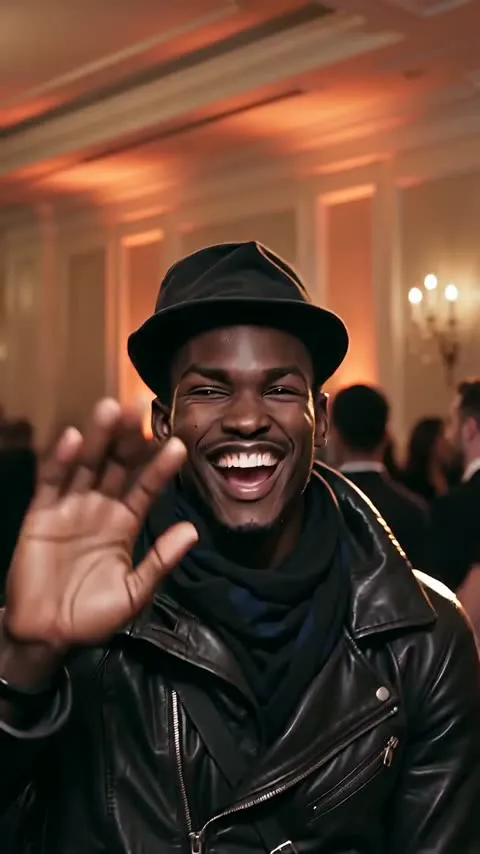
The Burning Bridges effect is a fast-cut montage in a crowded banquet hall with chandeliers and warm low light. The handheld camera cuts on the beat about every two seconds: you dance toward the camera, raise a glass, wave and laugh, put a hand to your brow to scan the room, and finish with a confident smile. Friends cheer and dance around you.
It recreates the feel of the trend, not a specific clip. Your face and outfit come from the photo you upload, and every render is generated fresh, so the lights, the crowd and the timing change from one video to the next. The example on this page is a real render made with this effect.
Read this before you upload or post.
Only upload photos you have the right to use, and only of people who are 18 or older and agree to it. Do not present your clip as an official video, a real recording or a collaboration with any artist or brand. The sound in each clip is the generated beat described above, and this page does not grant you rights to any song. When in doubt, read the terms of service before you post.
The same product also turns two people into a rap duo. Each scene suits a different occasion.
The closest match: string lights, friends and a verse for the whole room, performed by a duo.
A friendly birthday roast for the person who can take a joke.
A back-and-forth on a city corner at night.
Two mics and acoustic panels for a recording-session feel.
A polished lobby and an unexpected duo.
Warm orange light and a hanging studio mic.
See every scene on the AI rap video page.
FAQ
Photos, the original song, posting and how this differs from the rap scenes.
It is a 12-second AI video made from your photo in the style of the Burning Bridges party trend: a fast-cut montage of you dancing, toasting and scanning a crowded party, cut to the beat. On this site it is one photo effect among many. It is not the original music video and is not an official video from the artist.
Use the creator at the top of this page. The Burning Bridges effect is already selected. Add your photo, pick the frame (the length is fixed at 12 seconds), confirm that you may use the photo, then press “Make my Burning Bridges AI video”. When it is ready, watch it and download it.
Only photos you have the right to use, of people who are 18 or older. Do not upload someone else’s photo without their permission, and do not use a celebrity’s face to pass a video off as them. A face in the finished video comes from the uploaded photo and does not mean that person approved it.
No. The video does not include any original song, original sound or recording by a specific artist. The beat and party noise are generated with each video, and there are no vocals.
You may share the videos you make, but downloading a video does not give you rights to anyone else’s music, trademarks or likeness. Check the rules of the platform you post on and make sure you have every permission you need. This page does not promise that a video is cleared for commercial use.
It uses the same photo-to-video product, in a different format. Burning Bridges is a short photo effect from one photo with a beat and no lyrics. The rap scenes, such as the house party AI rap video and the birthday roast AI rap video, turn two people into a duo performing original lyrics. See every AI rap video scene on the scenes page.
Go back to the creator, add your photo and make your clip.
Make my Burning Bridges AI video