Sound included
Original lyrics from your topic or your own lines, a backing beat and lip-synced vocals, all generated together with the picture.
Scene · Tiny Desk
Tiny Desk AI turns your photos into a rap video of the two of you performing at a desk in a small room. It is a style scene on AI Rap Videos, not an official NPR or Tiny Desk performance.
Upload your photos below and your Tiny Desk AI video renders here, in the scene shown on the right.
Everything below is decided in the creator above, before you render.
Original lyrics from your topic or your own lines, a backing beat and lip-synced vocals, all generated together with the picture.
8, 12 or 15 seconds, in 9:16, 1:1 or 16:9. The creator only offers the combinations your account can use.
When the render finishes, the video opens on its own page and stays in My videos, where you can download it or send it to your phone.
A small-room desk concert inside a rap video product, made from your photos.
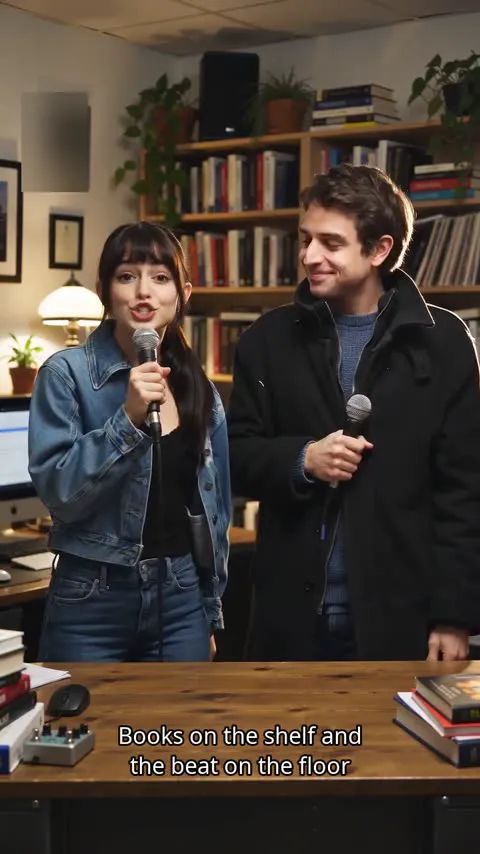
The Tiny Desk AI scene is a small-room desk concert. The two people from your photos stand side by side behind a cluttered wooden desk, with crowded bookshelves, a few house plants and a vintage desk lamp behind them. The camera stays close, in one steady shot, so the faces and the rap delivery carry the video.
It is one scene inside a rap video product, not a filter or a one-click effect. Your photos become the performers, the verse is written for your topic, and the beat and vocals are generated with the picture. Nobody needs to play an instrument, set up a room or record a take.
The name only describes the look people search for: an intimate set at a desk instead of a big stage. The video is not made with or approved by NPR or Tiny Desk, and it does not recreate any real episode, artist or song.
The steps match the numbered parts of the creator at the top of this page.
Tiny Desk is already selected on this page, so the performance always happens at the desk in the small room. You can open the other scenes from the scene list if you change your mind.
Add two separate photos, one person each, or switch to one photo with both people in it. The upload box checks each photo before it is used and tells you which one to replace if it cannot be used.
Pick the model, length, frame and quality, give the verse a short topic or paste your own lyrics, and confirm that you may use the photos. The button shows the cost before anything is charged.
If your account has enough credits, they are charged when the render starts and the full video is yours. If not, and the creator offers it, you can keep one unpaid video, watch a short watermarked preview, and unlock the full file later with credits or a one-time payment.
The desk scene is shot close, so the photos matter more than the topic. Two people perform: use two photos with one person each, or one photo of both.
Use sharp photos where each face fills a good part of the frame. Small, blurry or heavily filtered faces lose detail at the desk.
Avoid hands, microphones, masks or big sunglasses over the mouth and eyes. The lip sync needs to see the mouth to follow the words.
Soft daylight or warm indoor light works best and matches the lamp-lit room. Strong shadows across the face make the performance harder to read.
Faces looking at the camera, or turned slightly, give the cleanest result. Full profiles and faces looking down are harder to animate.
Everyone pictured must be 18 or older, and you need permission to use each photo. Read the terms of service and the privacy policy for how photos are handled.
A clear line between what the Tiny Desk AI scene makes and what it never claims.
FAQ
Short answers about the scene, your photos and what this page does not promise.
It is a rap video made from your photos in a small-room desk concert style: two people performing up close at a desk. It is not NPR or Tiny Desk content, and it is not a copy of any real performance.
Use the creator at the top of this page. The Tiny Desk room is already selected. Add two photos or one photo of both people under “Who’s rapping?”, choose your options under “Model & length”, add a topic or your own lyrics, then press “Render our rap”.
No. You do not need to film anything or build a set. The room, the desk and the backing beat are generated with the video. The video does not promise any particular instrument on screen.
Only if you have the right to use their photos and they agree to be in an AI-generated video. Everyone pictured must be 18 or older. The terms of service explain the photo rules.
No. This page does not set any of them. The creator shows the options and the credit cost next to the render button before you generate.
Add your photos and render the Tiny Desk scene.
Back to the creator