
Your faces, new outfits
Faces, hairstyles and skin tones stay the same; only the clothes change. With one photo, that person becomes the vampire. Masks and face paint that hide the face are not used.
Photo effect · Halloween Costume
Make a Halloween costume AI video from one photo or two selfies. A swirl of orange leaves and purple mist sweeps past, and you come out of it as a vampire and a witch on a porch lined with glowing jack-o’-lanterns under a full moon, then strike a spooky pose and burst out laughing. Faces stay yours; only the outfits and the scene change. Add your photos in the creator below and watch the real example before you start.
Upload a photo to preview your Halloween costume AI video.
Three steps, all in the creator at the top of this page.
Under “Your photo”, add one clear photo. For a couple or two friends, switch to “Separate selfies” and add one portrait each. A sharp face, good light and nothing covering the eyes give the best result.
The effect is already set on this page. Under “Model & length”, choose 5 or 10 seconds and 9:16, 1:1 or 16:9, confirm that you may use the photos, and press the button. It shows the cost before anything is charged.
The finished clip opens on its own page and stays in My videos, where you can download it or send it to your phone to post.
If your account has enough credits, they are charged when the render starts and the full video is yours. If not, and the creator offers it, you can keep one unpaid video, watch a short watermarked preview, and unlock the full file later with credits or a one-time payment.
One continuous shot with a slow push-in, no cuts. The example is a real render made with this effect.
The start. You stand exactly as in your photo and smile at the camera while a few orange leaves drift into the frame.
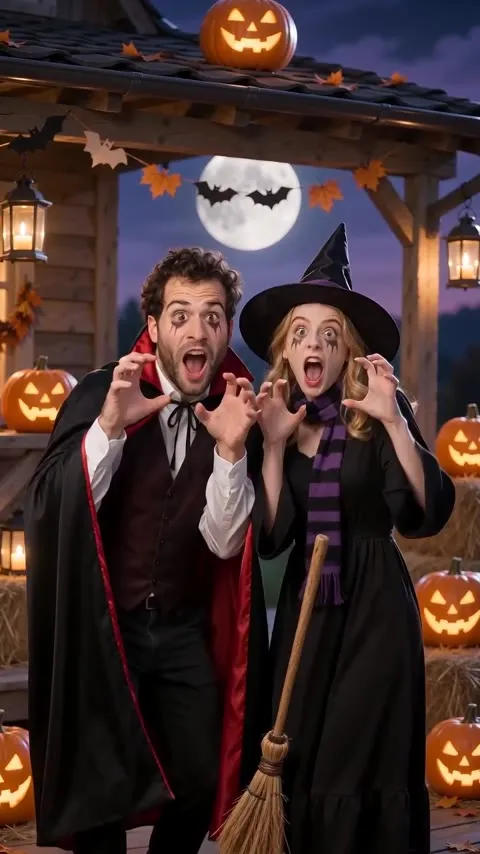
The costume change. A gust spins a ring of orange and red leaves and soft purple mist around you. As it passes, one person is wearing a vampire costume, a black high-collared cape with a red satin lining over a dark waistcoat, and the other a witch costume with a long black dress, a striped scarf, a pointed hat and a small broom. The background becomes a wooden porch with jack-o’-lanterns, candle lanterns, hay bales and paper bats under a full moon.
The ending. You both lean toward the camera, raise your hands like claws, pull a spooky face and break into a laugh. The sound is rustling leaves, a whoosh on the change, a distant owl and a playful spooky groove, with no vocals.
Chosen in the creator before you render.
Faces, hairstyles and skin tones stay the same; only the clothes change. With one photo, that person becomes the vampire. Masks and face paint that hide the face are not used.
Pick the length and the frame that suit where you will post it. The creator only offers the options your account can use and shows the cost on the button.
The sound is generated with the video: leaves, a whoosh, an owl and a bouncy spooky beat. There are no lyrics and no song by any artist in the clip.
Most people make it with someone. A few ways to use it.
Two selfies, one vampire and one witch, the same porch and the same laugh at the end. No shopping for matching outfits.
Send it to the group chat on Halloween morning, or post it as your costume reveal.
Open your Halloween party invite with the two hosts in costume, then add the time and place in the caption.
Read this before you upload or post.
Only upload photos you have the right to use, and only of people who are 18 or older and agree to it. The costumes are generic Halloween looks, not characters from any film, game or comic, so do not present your clip as official, licensed or made with any brand. When in doubt, read the terms of service before you post.
Other effects and rap scenes from the same creator.
Another photo effect: a 12-second, fast-cut party montage from one photo.
A street freestyle duo with original lyrics, made from two photos.
Your duo performs an original verse at a late-night house party.
See every scene on the AI rap video page.
FAQ
Costumes, photos, posting and what to expect.
It is a 5 or 10-second AI video made from your photos. You start as you are in the photo, a swirl of orange leaves and purple mist sweeps past, and you come out of it in a Halloween costume on a porch lined with glowing jack-o’-lanterns under a full moon. It ends with a playful spooky pose and a laugh.
Use the creator at the top of this page. The Halloween Costume effect is already selected. Add one photo, or switch to “Separate selfies” and add one portrait for each person, pick the length and frame, confirm that you may use the photos, then press “Make my Halloween costume video”.
With two people, one becomes a vampire in a black high-collared cape and the other a witch in a long black dress, a striped scarf and a pointed hat with a small broom. With one person, they become the vampire. You cannot pick other costumes, and every render is generated fresh, so details change from one video to the next.
No. It is meant to be fun and family-friendly: no gore, no fake blood and no masks. Faces stay visible the whole time, and the “scary” moment is a claws-up pose that ends in a laugh.
No. The costumes are classic, generic Halloween looks. The effect does not recreate characters from films, games or comics, and you should not present the video as an official or licensed one.
Only photos you have the right to use, of people who are 18 or older and agree to it. Do not upload someone else’s photo without permission or use a celebrity’s face. A face in the finished video comes from the uploaded photo and does not mean that person approved it.
Outside references for the costume choices and the photo rules above.
Classic Halloween costumes are modeled on figures such as vampires, witches and skeletons, the generic looks this effect uses.
Films, games and comics are protected works, one reason the effect uses generic costumes instead of named characters.
The right of publicity covers commercial use of a person’s name and likeness, one reason to use only photos of yourself or people who agree.
Go back to the creator, add your photos and make your clip.
Make my Halloween costume video