
Your face, your look
Your face, hairstyle and skin tone stay the same and your outfit carries over from the photo. The road, the blast and the light around you are added.
Photo effect · Explosion Walk
Make an explosion walk AI video from one photo. You start crouched on the centre line of an empty highway at night, stand up and walk toward the camera, snap your fingers, and the spot where you started bursts into a wall of fire behind you. You keep walking, never looking back, as the fire turns into embers and smoke. Your face stays yours; the road, the blast and the light are added. Add your photo in the creator below to start.
Upload a photo to preview your explosion walk AI video.
Three steps, all in the creator at the top of this page.
Under “Your photo”, add one clear photo of yourself. A sharp face, good light and a half-body or full-body shot give the best result.
The effect is already set on this page and always makes a 10-second 9:16 video. Choose the model, confirm that you may use the photo, and press the button. It shows the cost before anything is charged.
The finished clip opens on its own page and stays in My videos, where you can download it or send it to your phone to post.
If your account has enough credits, they are charged when the render starts and the full video is yours. If not, and the creator offers it, you can keep one unpaid video, watch a short watermarked preview, and unlock the full file later with credits or a one-time payment.
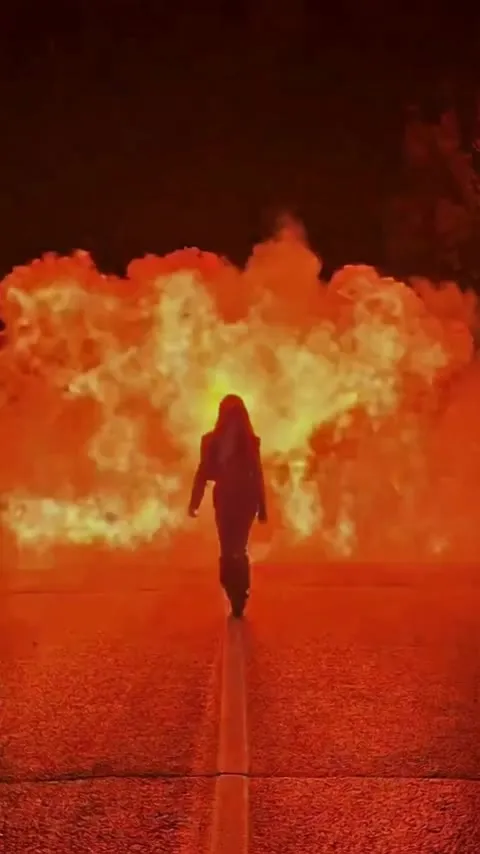
One continuous shot from a fixed camera low on the road, no cuts. The example is a real render made with this effect.
The start. Far down an empty two-lane highway at night, lit only by headlights from behind the camera, you crouch on the white centre line, then stand up and walk straight toward the camera.
The snap. A few seconds in, you raise a hand and snap your fingers. The spot where you started explodes: a white flash, flames shooting sideways along the road, then a wall of fire across the whole frame that turns you into a dark silhouette, still walking and never looking back.
The ending. The fire breaks into small flames, falling embers and low smoke, the night comes back, and you walk on toward the camera with your face lit again. The sound is footsteps, a snap, a deep boom and the roar of the fire over a heavy, slow hip-hop beat, with no vocals.
Chosen in the creator before you render.
Your face, hairstyle and skin tone stay the same and your outfit carries over from the photo. The road, the blast and the light around you are added.
Every explosion walk is a vertical clip made for Reels, TikTok and Shorts. Pick the model in the creator; it only offers the options your account can use and shows the cost on the button.
The sound is generated with the video: footsteps, a boom, the fire and a slow hip-hop beat. There are no lyrics and no song by any artist in the clip.
A few ways people use an action-movie entrance.
Open a new account, a channel trailer or your first reel like the lead of an action movie.
A new job, a launch, a move or a result you are proud of, delivered with a bang. Add the news in the caption.
For the friend who never looks back at a problem, or a duo that just finished something hard together.
Read this before you upload or post.
Only upload photos you have the right to use, and only of people who are 18 or older and agree to it. The blast is a staged, movie-style effect: never post the clip as real footage of an event, a threat or the news, and do not place it in a real, recognisable location in your caption. When in doubt, read the terms of service before you post.
Other effects and rap scenes from the same creator.
Another photo effect: a swirl of leaves turns you into a vampire and a witch.
A 15-second, one-take party entrance and toast from one photo.
Your duo performs an original verse at a night-time street cypher.
See every scene on the AI rap video page.
FAQ
Photos, safety, posting and what to expect.
It is a 10-second vertical AI video made from one photo of you. You start crouched on the centre line of an empty highway at night, stand up and walk toward the camera, snap your fingers, and the spot where you started bursts into a wall of fire behind you while you keep walking without looking back.
Use the creator at the top of this page. The Explosion Walk effect is already selected. Add one clear photo of one person, choose the model, confirm that you may use the photo, then press “Make my explosion walk video”.
Not in this effect. It follows a fixed one-person shot, so it takes one photo of one person. For two people, try the Halloween costume effect or one of the rap scenes.
No. Nothing is filmed: the video is generated, and the blast is styled like a controlled film-set effect far behind you. Nobody is hurt, there are no weapons and no vehicles, and your face stays visible whenever it is lit.
A sharp photo of one person with the face in good light and nothing covering the eyes. A half-body or full-body photo gives the walk the most to work with; with a close-up, the rest of the body is filled in by the model.
Only photos you have the right to use, of people who are 18 or older and agree to it. Do not upload someone else’s photo without permission or use a celebrity’s face, and do not present the clip as real footage of an event.
Outside references for the movie look and the photo rules above.
Explosions in films are staged special effects made for the camera, the movie look this effect imitates.
The film technique that makes the walk and the blast feel larger than life.
The right of publicity covers commercial use of a person’s name and likeness, one reason to use only photos of yourself or people who agree.
Go back to the creator, add your photo and make your clip.
Make my explosion walk video